digital calendar
august 18, 2026
i would have expected to have a calendar linked to my org files but i still wish i have a calendar app where i can see and edit stuff, yes there is a way to connect google calendar with gcal package, but again i dont want to be in the google ecosystem, so why not self host this too.
so i am going to use these programs to do this:
- radicale: self hosted CalDAV server to sync between devices
- vdirsyncer: sync calendar between the server and local files to view calendar on ikhal
- khal: a cli and a tui to view calendars
- KashCal: android calendar app
setup
radicale
first create a radicale config at ~/.config/radicale/config
[server]
hosts = 0.0.0.0:5232

[auth]
type = none

[storage]
type = multifilesystem
filesystem_folder = ~/.local/share/radicale/collections
and start radicale server by running radicale binary
open up the web interface at the port specified in the config which here is http://localhost:5232 and add a new user and a new collection
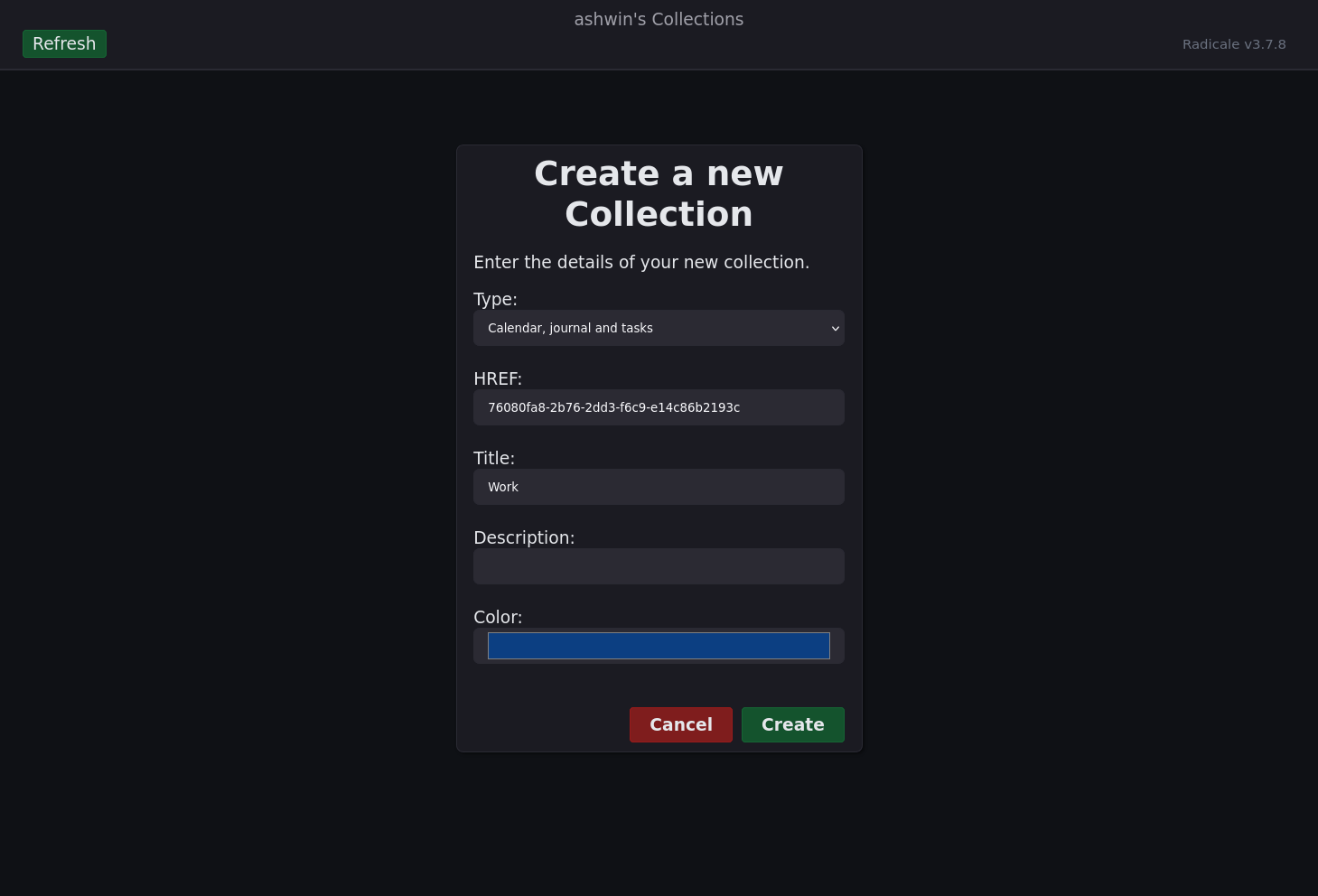 here in the example is a work collection with the id
 76080fa8-2b76-2dd3-f6c9-e14c86b2193c and will use this as a reference for this setup.
khal
you can use an app that directly supports CalDAV calendars but i love complicating things and want khal so i have to first get the collections from radicale and syncing them to a ics files that khal can read and update as requried and vice versa.
this can be accomplished by using an app like vdirsyncer to handle this.
create a vdirsyncer config file at ~/.config/vdirsyncer/config
[general]
status_path = "~/.local/share/vdirsyncer/status/"

[pair work_calendar]
a = "work_local"
b = "work_remote"
collections = ["76080fa8-2b76-2dd3-f6c9-e14c86b2193c"]

[storage work_local]
type = "filesystem"
path = "~/Org/calendar/"
fileext = ".ics"

[storage work_remote]
type = "caldav"
url = "http://localhost:5232/"
username = "RADICALE_USERNAME"
password = "RADICALE_PASSWORD"
update the username and password with the right ones.
you can enable vdirsyncer by
# discover the collections (run it when you edit the config)
vdirsyncer discover

# run it to sync between server and local .ics files
vdirsyncer sync
now since we have real .ics files on our system we can read them using khal.
create a khal config file at ~/.config/khal/config
[calendars]

[[work]]
path = ~/Org/calendar/76080fa8-2b76-2dd3-f6c9-e14c86b2193c
type = calendar
color = light blue

[locale]
timeformat = %H:%M
dateformat = %Y-%m-%d
longdateformat = %Y-%m-%d
datetimeformat = %Y-%m-%d %H:%M
longdatetimeformat = %Y-%m-%d %H:%M

[default]
default_calendar = work
now you can start a interactive tui using ikhal command
create some test items to see if it syncs with the server and run vdirsyncer sync to update em. and the number of items should increase in the web ui of radicale
kashcal
now to connect the radicale server on android im using kashcal to just connect to it on the phone but first you need to pass the radicale port from your computer if you have a firewall (you should)
# for ufw
sudo ufw allow from 192.168.1.0/24 to any port 5232 proto tcp comment 'Radicale'
now you can access that port on your machine in your local network.
its preferred you have a static ip for your server/main machine like for example 192.168.1.69
and now just install kashcal and add the radicale server in the app:
- server ip eg:
http://192.168.1.69:5232 - username
- password
and voilà it should just prompt to add the collections and start syncing if youve done it correctly!
service
for radicale create a service at ~/.config/systemd/user/radicale.service
[Unit]
Description=A simple CalDAV (calendar) and CardDAV (contact) server

[Service]
ExecStart=/usr/bin/radicale
Restart=on-failure

[Install]
WantedBy=default.target
for vdirsyncer create a service at ~/.config/systemd/user/vdirsyncer.service
[Unit]
Description=vdirsyncer synchronization

[Service]
Type=oneshot
ExecStart=/usr/bin/vdirsyncer sync
and a timer to periodically run vdirsyncer at ~/.config/systemd/user/vdirsyncer.timer
[Unit]
Description=Run vdirsyncer periodically

[Timer]
OnBootSec=5min
OnUnitActiveSec=15min

[Install]
WantedBy=timers.target
you can start and enable these services using systemd!
systemctl --user enable --now radicale.service
systemctl --user enable --now vdirsyncer.timer
finale
so finally the system at the end looks like this
                    ┌── ikhal
                    │
Org/calendar/ ← vdirsyncer ← Radicale ← KashCal
                    │
                    └── other CalDAV clients